
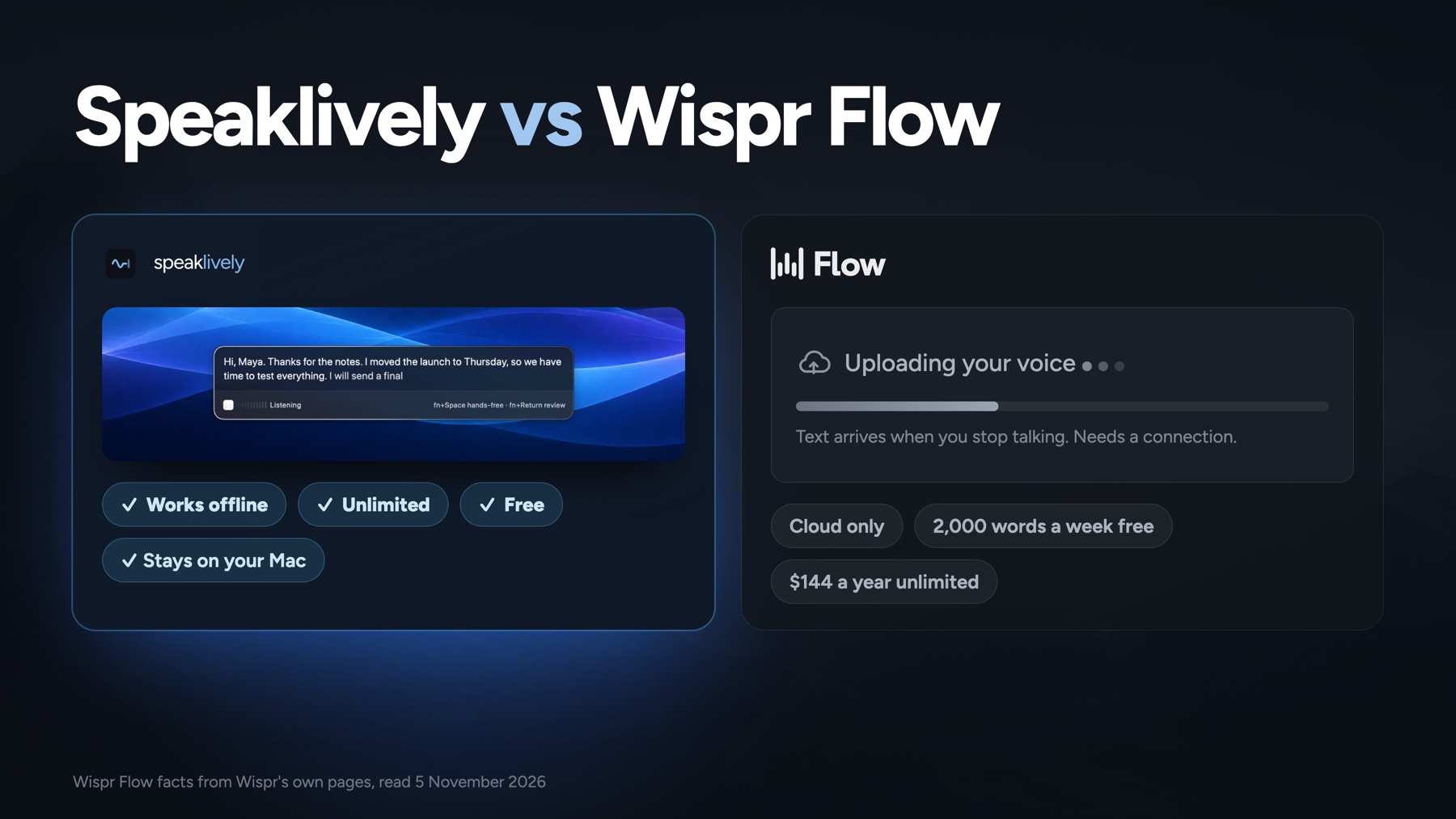
I make Speaklively, so read this knowing that. Every fact about Wispr Flow below comes from Wispr's own website and help centre, read on 5 November 2026 and linked at the end. I did not install Wispr Flow for this page; what I say about using it comes from their docs and from users' public reviews, quoted with links. If I have something wrong, tell me and I will fix it.
The short version
Four reasons each way, then the honest “neither”.

Pick Speaklively if…
- You want free, with no limitUnlimited dictation, no account, no card. Free forever, not free for now.
- Your voice should stay homeTranscribed on your Mac. Works on a plane, on a train, with Wi-Fi off.
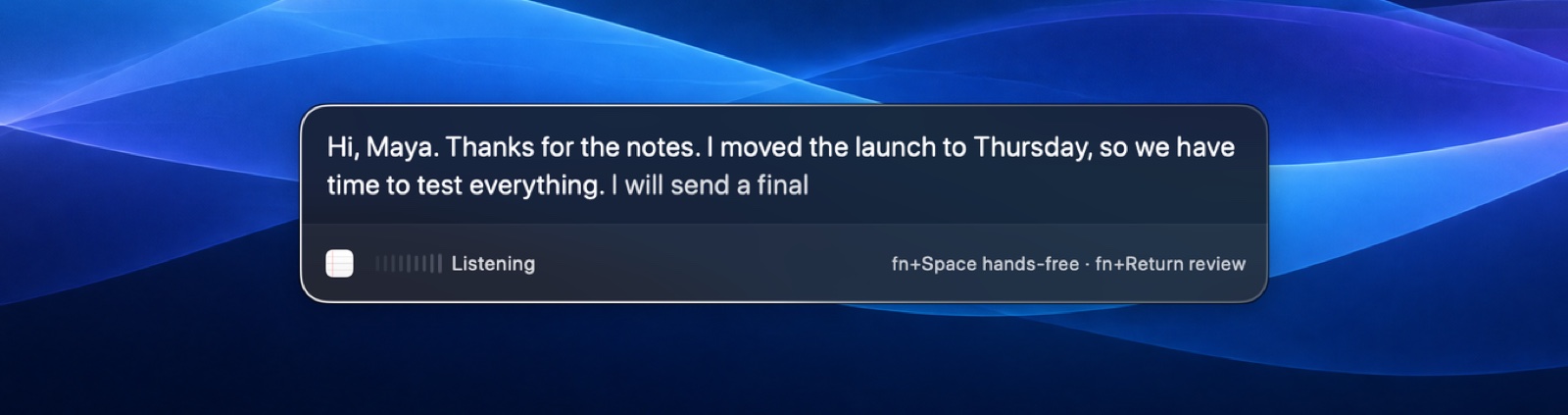
- You want to see the words as you say themA panel shows them live, so a wrong name gets fixed before it lands.
- You are done with sign-insDownload, open, hold fn. There is no account to make.
Stay with Wispr Flow if…
- You need Windows or a phoneOne account across Mac, Windows, iPhone and Android.
- You want it rewritten for youFormatting matched to the app, editing by voice on paid plans. $12 to $15 a month.
- You want meeting notes tooWispr's Notetaker runs on Mac and Windows.
- You dictate in a language Apple lacksWispr lists 100+. Apple's on-device models cover 54.
Neither is right if
- You are on an Intel Mac, or anything before macOS 26. Speaklively is built for Apple silicon on macOS 26 and later. If you also will not put your voice in the cloud, look at an app that runs Whisper locally, such as Superwhisper, and check its own requirements.
- You need offline transcription on Windows. Neither app does that.
Side by side
Checked 5 November 2026 against Wispr Flow’s own pages. A tick marks the row’s winner; the other side is still true.
SpeaklivelySeven rows to Speaklively, four to Wispr Flow. The four are real; read them before you download anything.
Try both for ten minutes before you decide
Both are free to start, so the best comparison is the one you run yourself. It takes ten minutes and tells you more than any table, including the one above.
“Hi Priya, thanks for the notes. I moved the launch to Thursday the 14th, so we have three extra days to test. The OAuth fix is in, um, the API latency is back under 200 milliseconds, and I will send a final build tonight.”
- 1Open a blank note. Install Wispr Flow’s free plan and Speaklively. Both are free and both take a couple of minutes.
- 2Hold the key and read the paragraph above into Wispr Flow. Let go. Then do the same into Speaklively.
- 3Count three things for each: seconds from your first word to the first word on screen, the number of edits you had to make, and whether it kept “OAuth”, “API latency” and “Thursday the 14th”.
- 4Now turn Wi-Fi off and read it once more into each.
If Wispr’s cleanup saves you more edits than the half-second and the offline run are worth to you, keep Wispr. If seeing the words as you speak changes how it feels, you will know in the first sentence. Either way, send me your numbers. I collect them. Tell the Maker.
What comes out
The real difference is not accuracy. It is who decides what happens to your words after the app hears them.
Speaklively
Clean by default. Polished when you want. Never rewritten behind your back.
Tidy cleans every dictation on the Mac as it lands: the ums, the false starts and the repeated words go, and nothing you meant goes with them, because it is rules, not a model guessing.
Polish gives you the same words as clean prose and Structure adds paragraphs and lists, one press each. Every dictation keeps all four versions, so you can always get back to what you actually said.
And you see it before it lands. A wrong name gets fixed in the panel, not in the email after it was sent.
Wispr Flow
It rewrites for you, every time.
Wispr Flow’s whole pitch is the cleanup: filler removed, punctuation and formatting added, matched to the app you are in. It learns your names and jargon, and you can add words and snippets yourself.
On paid plans, Command Mode lets you hold a shortcut and say what to change.
The text arrives after you stop. Wispr’s own comparison page describes the result as what comes out “when you stop talking”.
Speed
One number here is measured. The other is a headline.
Speaklively
First word in about half a second.
Because recognition happens on the Mac, the first word shows up about half a second after you start speaking. On the MacBook Air this page was written on, that measured at 524 milliseconds with macOS 26’s live mode on, and over three seconds with it off, which is why it is on.
There is no round trip, so the speed does not change with your connection, and it is the same on a train.
Wispr Flow
Upload, transcribe, download, then the text.
Wispr’s headline is “4x faster than your keyboard”, with a demo of 45 words a minute typed against 220 dictated. No method is given, and 45 to 220 is nearer five times, so treat it as a claim about typing rather than a measurement of the app.
Every dictation goes to Wispr’s servers and back, so the wait depends on your connection. One Product Hunt reviewer wrote in September 2026 that “the current non-streaming mode feels slow for longer content”.
Where your voice goes
This is the biggest difference, and Wispr is not shy about it.
Speaklively
Never leaves the Mac.
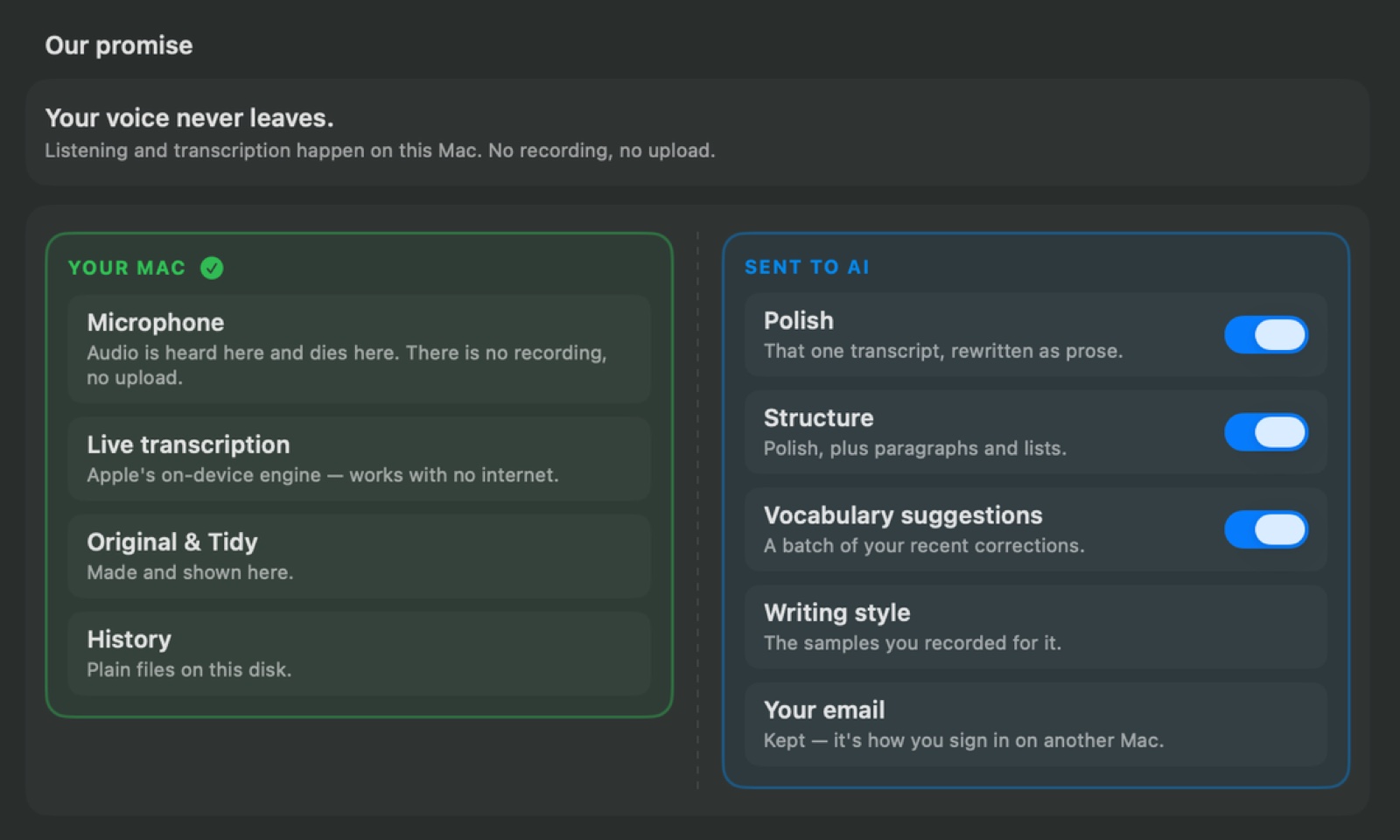
Your voice never leaves the Mac. Listening and transcription happen on-device with Apple’s speech models, there is no recording, and your history is plain files on your own disk.
The only thing that ever goes out is one transcript, as text, when you press Polish or Structure. It goes through a relay I run, which counts what the call cost and keeps no transcript, prompt or reply, and on to Claude. Nothing goes anywhere until you press.
Wispr Flow
Always goes to Wispr’s servers.
Transcription always happens in the cloud. Wispr says so plainly, and says that turning cloud storage off does not stop cloud processing.
Two switches default to on for Free and Pro accounts: cloud storage of your dictations, and using them to improve Wispr’s models. Both can be turned off in Settings, under Data and Privacy. Enterprise accounts have training off with no way to turn it on.
Wispr also reads limited text from the app you are dictating into, for context. It holds zero-retention agreements with its AI providers, is audited for SOC 2 Type II and ISO 27001, and stores data in the United States.
What it costs over a year
Dictation costs you nothing in Speaklively. In Wispr Flow it costs nothing until you pass 2,000 words in a week.
Speaklively
$0 for dictation, forever.
Dictation, live words, Tidy and history: $0, forever. They cost me nothing per use, so there is nothing to charge for.
The AI cleanups are the one part that costs me money every press. Your first 15 are free with no email, 100 more with your email, and after that it is $39 for 12 months, though checkout is not open yet. Or point them at your own Anthropic key, which stays free on my side, and pay Anthropic only for what you use.
Wispr Flow
$0 up to 2,000 words a week, then $144 a year.
Free: 2,000 words a week, with no card and no trial countdown. That is roughly a page and a half a day on weekdays, which is fine for messages and tight for long emails.
Pro: $15 a month, or $12 a month billed yearly, so $144 a year for unlimited dictation. Team and enterprise plans cost more and add admin controls, single sign-on and a signed BAA.
There are no commitments and you can cancel at any time. Wispr’s pages do not state a refund policy.
Setup and feel
Both default to the fn key on a Mac. The feel after that is where they differ.
Speaklively
Download. Hold fn. Talk. Everything else is already there.
- 1Download and open it from Applications. Nothing to sign in to, no model to download.
- 2Allow the microphone and typing when it asks. Setup walks you through both.
- 3Hold fn and talk Let go, and the words land where your cursor is.
- 4Hands-free, review first, or your own shortcut fn and Space, fn and Return, right ⌘, or any keys you record.
- 5Your words and your history stay yours Vocabulary learns your names and terms; every dictation is kept on your Mac in four versions.
A native Mac app in the menu bar, notarised by Apple, that picks any microphone you have and updates itself.
Wispr Flow
Install, sign in, practise, then dictate.
Install, sign in, grant permissions, and finish a practice dictation. Macs with an fn key default to fn; Macs without one use Control and Option.
Push to talk or hands-free, a personal dictionary and snippets, and on paid plans, Command Mode. It feels like a service as much as an app: your dictionary, history and settings follow you across devices through Wispr’s cloud.
Reviewers’ complaints are mostly about the Windows build. One on Product Hunt called it “electron based” and said it “uses 800 megabytes of RAM”. I have not measured either app’s memory, so take that as one person’s report.
What people say
From Wispr Flow’s Product Hunt reviews, rated 4.8 from 84 reviews when read on 5 November 2026. Three that praise it, three that do not.
“I speak three and a half times quicker than I can type.”
“it keeps up with normal speaking speed without garbling things.”
“It’s easily one of the best tools in my stack.”
“Privacy would be, let’s say... my only real concern.”
“But it’s electron based and uses 800 megabytes of RAM”
“the current non-streaming mode feels slow for longer content.”
Speaklively is a few months old and made by one person, so there is no Product Hunt page or Reddit thread to quote yet. These are two of the people who tried it first, in their own words.
“It’s so fast. Awesome. Works faster than Wispr.”
 Aniruth MuraliHas tried Wispr Flow and VoiceInk
“I didn’t want to deal with setting up local models. I wanted something simple, sleek and optimized, and now I have it.”
 HarshineeEarly tester
The report card
Three things each one does best, and three things worth knowing before you choose.
Speaklively
Does best
- Free, unlimited, no account
- Voice stays on the Mac, and it works offline
- Words live, the first in about half a second
Worth knowing
- Needs macOS 26 or later on Apple silicon
- 54 languages, not 100+
- No meeting notes yet
Wispr Flow
Does best
- The best automatic cleanup and formatting
- Mac, Windows, iPhone and Android, plus a Notetaker
- 100+ languages, and voice editing on paid plans
Worth knowing
- Voice always goes to the cloud; nothing offline
- 2,000 words a week free, then $144 a year
- Storage and model training on by default
Switching takes about two minutes
- 1Quit Wispr Flow, or move it to a different shortcut, so the two don’t answer the same key. Both default to fn.
- 2Download free for Mac and open it from Applications.
- 3Allow the microphone and typing, and free up the 🌐 key. Setup walks you through each one.
- 4Your Wispr dictionary does not come across. Add the words that matter to Speaklively’s Vocabulary; it suggests more from your corrections.
- 5Hold fn and talk. That’s the whole thing.
Good questions
Is Speaklively really free?
Yes. Dictation, live words, Tidy and your history are free forever: unlimited, no trial, no account. The only part that costs money to run is the optional AI cleanups, Polish and Structure. Your first 15 are free with no email, 100 more come with your email, and after that it is $39 for 12 months, though checkout is not open yet, or you point them at your own Anthropic key and pay Anthropic directly.
Does Wispr Flow work offline?
No. Wispr says transcription runs in the cloud and needs a connection on every platform. Speaklively transcribes on the Mac, so it works with Wi-Fi off.
Does Wispr Flow use my voice to train its models?
By default on Free and Pro, yes. Wispr’s setup guide says “Improve the model for everyone” is on by default for those plans and off for Enterprise. You can turn it off in Settings under Data and Privacy, and Wispr says nothing you say is then used for training. Speaklively has no such switch because nothing is recorded or uploaded.
Which one is more accurate?
I have not measured Wispr Flow, so I will not claim a number. Speaklively uses the speech recognition built into macOS 26, running on your Mac. For everyday English it is very good, and the measurements published on this site show where it slips: technical terms. Wispr’s cleanup model will catch more of those by rewriting; Speaklively’s Polish can do the same when you press it. The ten-minute test above settles it for your voice.
Can I keep both?
Yes. They don’t interfere as long as each has its own shortcut. Speaklively can use fn, right ⌘, or any key combination you record.
Can I use Speaklively on Windows or my iPhone?
No. Speaklively is made exclusively for Mac: macOS 26 and later on Apple silicon, because it uses Apple’s on-device speech models. If you need one tool across devices, Wispr Flow is the one to keep.
What exactly leaves my Mac when I press Polish?
One transcript, as text, through a relay I run and on to Claude. The relay counts what the call cost and keeps no transcript, prompt or reply. Nothing is sent until you press, and nothing is sent at all if you use dictation, live words and Tidy only.
Sources
Every Wispr Flow fact on this page comes from one of these, read on 5 November 2026. Spot something out of date? Tell me and I’ll fix it.
- 1.Wispr Flow pricing: plans, the $15 and $12 prices, what Free includes
- 2.Wispr Flow home page: “Is Flow free?” (2,000 words a week), “4x faster”, platforms, certifications
- 3.Help centre: manage data sharing, cloud storage and local history (both switches default to on)
- 4.Help centre: setup guide (sign-in, default shortcut, training default)
- 5.Wispr Flow privacy page (cloud transcription, storage, context, encryption)
- 6.Wispr Flow vs Apple Dictation, Wispr’s own page (offline, Command Mode, “when you stop talking”)
- 7.Wispr Flow data controls (training opt-out, zero-retention agreements, usage statistics)
- 8.Wispr Flow Notetaker (Mac and Windows, languages, consent)
- 9.Help centre: security and compliance FAQ (data location, deletion, audits)
- 10.Help centre: use Flow with multiple languages (one language per dictation)
- 11.Wispr Flow reviews on Product Hunt (4.8 from 84, the quotes above)
- 12.Speaklively’s own measurement of the on-device model on technical terms

Try it next to what you use now
Free, unlimited, no account. Hold fn and talk. If it isn’t for you, delete it and nothing of yours is anywhere.
Free forever · No account · macOS 26 · Apple silicon